AI Food Photo Editing Prompts With Dish-Safety Checks
When restaurant operators use AI tools to adjust food imagery, standard generative prompts often cause costly errors. Generic instructions like "make this burger look delicious" or "studio lighting for pasta" frequently hallucinate ingredients, modify portion sizes, change plateware, or smooth away the natural texture of real food. When a customer receives an order that fails to resemble the digital listing, the listing can mislead customers.
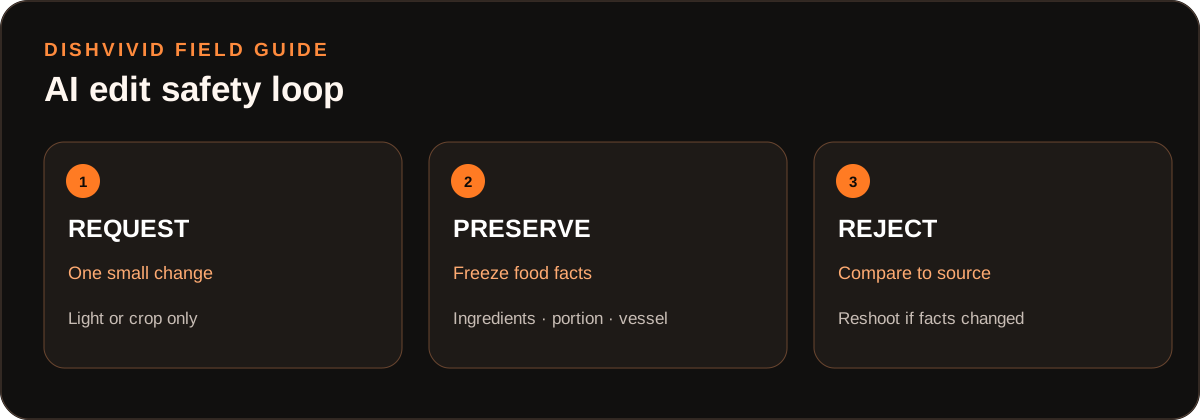
Editorial diagram for planning; it is not a customer photo or measured result.
The solution is not to avoid automation, but to constrain it. Effective AI food photo editing prompts function like surgical camera adjustments rather than generative redesigns. By pairing small, single-purpose prompts with explicit preservation clauses and rigid rejection rules, you can fix technical exposure, white balance, or background distractions while keeping your menu items accurate and trustworthy.
1. The Scope Rule: Treat Prompts as Adjustments, Not Generators
Generative models can invent detail. If you give an AI editor broad freedom to reinterpret a dish, it may add sesame seeds to an unseeded bun, thicken a sauce, or increase the apparent volume of fries.
To maintain operational integrity, enforce a strict operational boundary:
- Allow: Global exposure balance, white balance correction, subtle shadow recovery, tight reframing, and non-contact background cleanup.
- Prohibit: Texture replacement, ingredient additions, portion changes, garnish rearrangement, or alteration of plateware and packaging.
This discipline aligns with standard consumer trust standards and platform policies. For instance, Google Business Profile photo guidelines require merchant photos to accurately represent reality and avoid excessive edits or misleading embellishments. If a prompt changes anything a line cook could not recreate on a busy Friday night, that prompt has overstepped.
2. Five Targeted Edit Prompts With Preservation Clauses
Every edit prompt must include two components: the specific corrective instruction and an unyielding preservation clause. Copy and adapt these five recipes for common kitchen capture problems.
Recipe 1: Exposure Correction
- Target Problem: Underexposed dishes shot in dim dining rooms or harsh glare from open prep lamps.
- Prompt Template:
"Adjust global exposure by +0.75 EV equivalent to reveal natural midtone details across the dish. [Preservation Clause]: Do not change ingredient geometry, edge contrast, sauce gloss, or surface textures. Keep all food elements identical to the source image." - Hard Stop: Reject immediately if highlights on proteins or melted cheeses blow out into flat white patches.
Recipe 2: Warm Color Cast Neutralization
- Target Problem: Orange or yellow tint caused by 2700K heat lamps and prep-station lighting that makes greens look wilted and poultry look muddy.
- Prompt Template:
"Neutralize yellow and amber color cast across the entire frame to a daylight 5500K balance. Restore accurate color temperature to the background surface and food ingredients. [Preservation Clause]: Maintain true food pigment saturation. Do not alter dish plating, glaze transparency, or surface contours." - Hard Stop: Reject if fresh greens turn neon or charred grill marks shift to an unnatural purple or slate-gray tone.
Recipe 3: Aspect Ratio and Canvas Crop
- Target Problem: Reformatting a horizontal 4:3 kitchen shot into a 1:1 square or 16:9 banner for online ordering platforms.
- Prompt Template:
"Extend the background canvas into a square 1:1 aspect ratio by continuing the flat neutral tabletop pattern. [Preservation Clause]: Do not generate additional food items, extra sides, garnish, silverware, or glasses. Keep the original plate, bowl, and food boundary centered and completely unmodified." - Hard Stop: Reject if the tool inserts phantom garnishes, extra sauce cups, or crops out the outer rim of the serving vessel.
Recipe 4: Background Distraction Cleanup
- Target Problem: Stray kitchen clutter, printer receipts, order tickets, or stainless steel grease reflections behind the plate.
- Prompt Template:
"Remove the paper receipt and metal ticket rail visible in the upper background. Replace that area with the existing matte wooden table texture. [Preservation Clause]: Do not touch the plate rim, the food surface, or the contact shadow cast by the dish on the table." - Hard Stop: Reject if the boundary of the plate softens, blurs, or blends into the regenerated tabletop.
Recipe 5: Shadow Lift on Deep Containers
- Target Problem: Heavy, unreadable shadows cast inside deep noodle bowls, salad bowls, or under stacked proteins.
- Prompt Template:
"Gently lift dark shadows in the bowl interior by +1 stop to reveal the underlying broth and noodles. [Preservation Clause]: Retain existing surface moisture, natural grain, and authentic contrast. Do not invent steam, synthetic highlights, or extra ingredients in darkened zones." - Hard Stop: Reject if deep shadows are replaced with flat, painterly fills devoid of real ingredient texture.
3. Practical Matrix: Five Prompt Recipes and Reject-or-Reshoot Rubric
Use this matrix during review to determine whether a processed candidate is acceptable, requires prompt revision, or demands a fresh camera capture.
| Target Adjustment | Core Prompt Recipe & Preservation Clause | Pass Criteria | Immediate Rejection Trigger | Reshoot Trigger |
|---|---|---|---|---|
| 1. Exposure | Global EV lift (+0.5 to +1.0); preserve raw edges and sauce specular highlights. | Midtones brighten; sauce preserves natural wet sheen without white clipping. | Blown-out highlights, flattened cheese, or missing char detail. | Source image clipped to 100% black in shadows or 100% white in highlights. |
| 2. Color Cast | Neutralize amber/orange cast to 5500K; preserve authentic ingredient saturation. | White plates turn neutral white; greens and sauces reflect natural kitchen state. | Greens turn radioactive; grilled meats turn chalky gray. | Mixed multi-source lighting (e.g., green neon combined with tungsten heat lamps). |
| 3. Reframe / Crop | Canvas outpaint of neutral tabletop; lock plate diameter and food contents. | Original plate perimeter untouched; extended canvas matches table grain. | AI inserts cutlery, extra fries, phantom dishes, or clips the vessel. | Subject is partially cut off at the camera edge in the original capture. |
| 4. Distraction | Inpaint specific object; preserve contact shadow and outer rim boundary. | Clutter removed; tabletop looks consistent; contact shadow intact. | Plate rim dissolves; dish appears to float without contact shadow. | Distraction overlaps or touches the food directly. |
| 5. Shadow Lift | Recover interior shadow zones; strictly preserve existing moisture and cut edges. | Previously hidden ingredients become recognizable with natural grain. | Airbrushed smooth patches; hallucinated steam or added broth sheen. | Shadow zone holds zero optical information (pure digital black noise). |
4. Worked Example: Guardrail Evaluation on a Cheeseburger Photo
(Hypothetical Example — Editorial Illustration)
Consider a source photo taken on the assembly line: a standard double cheeseburger served on wax paper over a wire basket. The room lighting is warm tungsten, and a ticket rack is visible in the upper background.
+------------------------------------------------------------------------+
| STEP 1: DEFINE OBJECTIVE & PROMPT                                      |
| Action: Balance warmth to 5500K and remove background ticket rack.     |
| Prompt: "Neutralize warm tungsten cast to neutral daylight. Remove the |
| ticket rack in the upper third. [Preservation Clause]: Keep the burger |
| bun, patty edges, cheese melt lines, and wax paper basket identical."  |
+------------------------------------------------------------------------+
                                   |
                                   v
+------------------------------------------------------------------------+
| STEP 2: REVIEW CANDIDATE OUTPUTS                                       |
|                                                                        |
| Candidate A (PASS):                                                    |
| - Bun remains plain golden-brown without added seeds.                  |
| - Cheese melt pattern matches the kitchen prep sheet exactly.          |
| - Background is a clean, neutral kitchen tile. Contact shadow intact.  |
|                                                                        |
| Candidate B (REJECT):                                                  |
| - Color is neutral, but top bun gained an artificial sesame coating.   |
| - A third patty was hallucinated between the bottom bun and beef.      |
| - Patty edges look airbrushed and lost authentic sear crust.           |
+------------------------------------------------------------------------+
                                   |
                                   v
+------------------------------------------------------------------------+
| STEP 3: WORKFLOW DECISION                                              |
| - Candidate A: Approved for production export.                         |
| - Candidate B: Rejected. Run manual color and crop in Studio, or       |
|   reshoot if the original capture is too dark to clean manually.       |
+------------------------------------------------------------------------+
When reviewing output variants in DishVivid Studio, compare the generated candidate directly against the source file. If the model modifies the bun silhouette or changes the perceived thickness of the meat, discard the AI candidate immediately.
5. Common Failure Modes and Practical Trade-Offs
When applying AI prompts to food photographs, watch for these recurring failure modes:
- Bread and Starch Hallucination: Neural networks frequently smooth out bread crust or add decorative toppings (sesame seeds, cracked pepper, flour dust) that your kitchen does not serve.
- Sauce and Liquid Plasticity: AI editors often struggle with semi-translucent liquids like broths, pan reductions, and dressings, turning them into solid gelatinous masses or mirrored plastic.
- Portion Creep: Re-lighting algorithms sometimes interpret deep shadows as missing food and fill the space with extra ingredients, inadvertently advertising an oversized portion.
The Speed vs. Verification Trade-Off
Using natural language prompts feels fast, but each prompt run creates a verification requirement. If a complex prompt takes three minutes of close inspection to confirm that every pea and garnish remained in place, manual slider adjustments (exposure, shadows, temperature) inside an image editor are often faster and safer. Reserve AI editing prompts for precise, tedious tasks—such as erasing a background order slip or expanding a square canvas—where verification takes seconds.
6. Pre-Publish Dish-Safety Checklist
Run through these five verification points before uploading an edited photo to your POS, third-party delivery platforms, or brand hub:
- Portion Count: Does the image show the exact count of proteins, sides, and garnishes included in the base price?
- Surface Realism: Are grill marks, sear textures, and sauce sheens original photographic pixels rather than smoothed AI skin?
- Boundary Integrity: Are the plate rim and cast contact shadows crisp, distinct, and grounded on the tabletop?
- Ingredient Truth: Are all visible toppings, bread types, and sauces matching the actual current recipe without additions?
- Platform Compliance: Does the file meet platform standards, such as Google's requirement for authentic, unmanipulated business representations?
For broader photography systems and multi-unit asset management, review our full operational guides on the DishVivid Blog to keep your team aligned from kitchen capture to final listing.
Sources
- Google Business Profile Help: Photo and video criteria for Google Maps and Business Profiles