Keep Menu Photos Accurate Across Multiple Locations
Managing multi location restaurant menu photos requires balancing brand-wide visual consistency with the operational reality of individual kitchens. When a restaurant brand operates across several stores, marketing teams often push a single centralized image library across every digital point of sale and third-party delivery channel. However, sharing a single "master photo" across all locations fails as soon as regional units introduce different serveware, localized toppings, varied packaging types, or slight portion deviations.
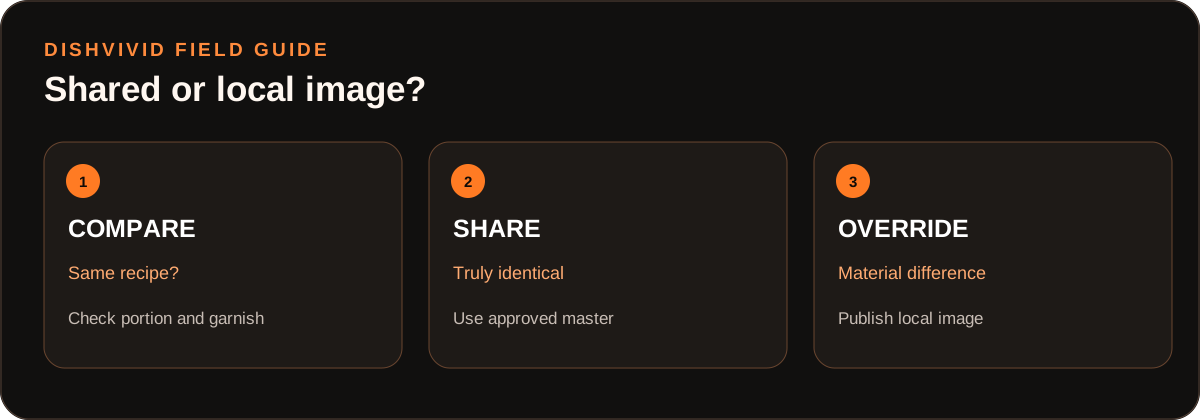
Editorial diagram for planning; it is not a customer photo or measured result.
When diners order an entrée based on a photo featuring a ceramic dining bowl and receive a takeout box with different garnishes, the image no longer represents that location's dish. The Uber Eats Merchant Photo Guidelines emphasize accurate depiction of the item offered.
To maintain visual accuracy without reshooting an entire menu for every new store opening, multi-unit operators need an explicit governance framework: clear rules dictating when a centralized master image applies and when a localized override is mandatory.
The Core Conflict: Central Standards vs. Kitchen Variation
In single-unit operations, menu photography is straightforward: photograph the dish as it leaves the pass. Across multiple units, three factors introduce discrepancies between digital listings and delivered plates:
- Tableware and Packaging Sourcing: A multi-unit group may utilize different suppliers or container formats depending on regional inventory, leading to differences between dine-in bowls, catering platters, and off-premise containers.
- Ingredient and Garnish Availability: Seasonal produce, regional micro-climates, or local supplier contracts frequently require individual stores to substitute garnishes, greens, or finishing sauces.
- Portion and Prep Differences: Kitchen layout, fryer size, or local prep procedures can subtly alter how a finished dish is stacked, layered, or portioned.
If marketing relies strictly on corporate master shots, local branches inherit representations that do not match their kitchen's output. Conversely, if individual general managers upload unvetted photos taken under inconsistent lighting, the brand loses its visual cohesion. The solution is a structured tiering system that defines acceptable variance.
The Master Image vs. Local Override Decision Matrix
A practical image governance system categorizes dish attributes into two categories: non-material variances (which allow the master photo to remain active) and material variances (which demand a local override photo).
The following matrix provides an operational baseline for multi-location teams to evaluate when an override is required, who approves it, and how to roll it back when supply conditions normalize.
(Note: The following table is an editorial framework created by the DishVivid Editorial Team as an operational illustration, not data from a specific client deployment.)
| Variation Type | Operational Condition | Governance Rule | Approving Role | Rollback Trigger |
|---|---|---|---|---|
| Identical Spec | Same recipe, identical portion, identical plate/packaging across all stores. | Master Image: All locations use the central brand asset. | Brand Marketing Lead | Never; remains master default. |
| Vessel / Tableware | Core recipe is identical, but regional stores use distinct dish shapes or off-premise containers. | Local Override: Local photo required showing the exact container delivered. | District Manager + Store GM | Uniform packaging inventory restored brand-wide. |
| Garnish Substitution | Long-term substitution of an identifiable visual component (e.g., goat cheese instead of parmesan). | Local Override: Local photo mandatory to reflect the visible recipe alteration. | Brand Culinary Director | Original spec ingredient returns to regular inventory. |
| Minor Cut / Herb Variance | Minor prep variation (e.g., chiffonade vs. chopped parsley) that does not alter recipe perception. | Master Image Permitted: Master photo remains valid if key ingredients match. | Store GM | Immediate correction to standard knife cuts during prep. |
| Portion / Volume Tier | Distinct local portion size due to regional pricing or kitchen format (e.g., fast-casual kiosk vs. full dining room). | Local Override: Mandatory separate photo for the specific location format. | Regional Operations Director | Alignment of menu format across operating units. |
Worked Example: Resolving Regional Salad Discrepancies
To understand how this protocol operates in day-to-day service, consider the following hypothetical scenario.
(Hypothetical Example) A fast-casual restaurant chain features a signature "Harvest Crunch Salad" on its core menu across two markets: Location A in Chicago and Location B in Denver.
- At Location A (Flagship): The salad is prepared in an 8-inch wide, shallow ceramic bowl, topped with shaved white cheddar and dried cranberries.
- At Location B (Express Unit): Due to kitchen footprint and local packaging constraints, the dish is served in a 6-inch deep kraft paper bowl and uses crumbled feta because the regional dairy supplier does not carry the specified white cheddar.
If corporate operations assigns Location A's master photo to Location B's online ordering menu, the presentation differs substantially. The customer at Location B receives a deep paper bowl where dense ingredients settle to the bottom, topped with a visibly different cheese. This variance triggers customer confusion and complaints regarding portion sizes and missing ingredients.
Workflow Resolution:
- Identification: The Location B store manager reviews the menu listing against the physical build during regional menu rollouts and flags the plateware and cheese variance.
- Capture: The kitchen prepares three consecutive orders using the standard Denver build. The team captures the plate under controlled, even light matching the brand's established 45-degree angle.
- Adjustment: Using tools like DishVivid Studio, the operator crops the image to standard digital menu dimensions and balances the exposure against the master brand guidelines without manipulating or artificially adding ingredients.
- Sign-off: The District Manager approves the image override in the central digital menu management tool.
- Rollback Condition: Six months later, when the group standardizes all regional packaging to a shared bowl spec, Location B retires the override and reconnects to the updated master asset.
For operators building out their primary photo library before implementing overrides, our comprehensive restaurant menu photo guidelines detail standard angles, lighting setups, and framing baselines.
Editorial Controls, Roles, and Rollback Protocols
A multi-unit photo workflow collapses if team responsibilities are ambiguous. A reliable workflow separates authoring from publishing:
- Central Brand / Marketing Lead: Maintains the master asset directory, sets the visual standard (lighting temperature, background surface, depth of field), and audits third-party listings monthly for unauthorized changes.
- Store General Manager / Kitchen Lead: Responsible for verifying physical plate builds against digital listings daily. They initiate override requests when supply changes or physical presentations deviate from the master photo.
- District / Operations Manager: Acts as the clearinghouse for overrides. They confirm that the override reflects an unavoidable operational reality rather than poor kitchen execution.
Rollback Protocols
Every local override must include an expiration date or review milestone. If a temporary ingredient shortage forces a substitute garnish, the local photo should be scheduled for review within 30 to 60 days. Once the kitchen returns to standard operational recipes, the listing must automatically roll back to the master asset. Leaving temporary overrides active after kitchens revert to standard builds introduces the same discrepancies they were created to prevent.
Common Multi-Unit Failure Modes
Operators managing multi location restaurant menu photos frequently encounter three operational pitfalls:
- Unilateral Field Uploads: Allowing store managers to upload photos directly from personal mobile phones to third-party delivery profiles creates disjointed, poorly lit grids that damage brand credibility.
- Ignoring Packaging in Off-Premise Menus: Showing a dine-in steak frites on porcelain on an off-premise delivery menu, while delivering it in a compartmentalized plastic clamshell, sets unrealistic expectations. When packaging materially changes the visual volume of the food, an off-premise override photo is required.
- Over-Editing Local Photos: In an effort to make a local substitution look like the corporate master, managers sometimes apply heavy filters or saturation boosts. Any post-capture editing should focus strictly on framing, cropping, and neutral color correction—never on concealing real ingredients or portions.
Multi-Location Menu Photo Checklist
Before publishing any new image across a multi-unit network, verify the asset against this protocol:
- Recipe Spec Match: Does the dish depicted match the exact recipe card currently executed in the target store?
- Serveware Accuracy: Does the photo depict the exact plate, bowl, or delivery container the guest receives?
- Garnish & Color: Are all visible toppings and dressings standard stock items at the specific location?
- Asset Alignment: Has the photo been cropped and leveled to match the visual grid of the broader menu?
- Override Designation: Is the file documented as either a central Master or a store-specific Override with a defined approver?
- Rollback Date Established: If the photo addresses a temporary supply variance, is a 30-day review date recorded?
For more strategies on maintaining operational consistency across your digital channels, visit the DishVivid Blog.
Sources
- Uber Eats Merchant Photo Guidelines — Official requirements for menu item representation, portion visibility, and photo quality.