Alt Text for Restaurant Menu Photos: Useful Examples
Writing effective alt text for restaurant menu photos requires identifying the exact functional role of each image on your digital ordering page, omitting redundant titles already displayed as text, and describing observable plate details—such as cooking method, visible side dishes, and portion structure—in concise plain English. For independent restaurants and hospitality groups, well-crafted alternative text fulfills two vital objectives: it allows guests using screen readers to understand what a dish looks like before ordering, and it provides search engines with clear context about your visual menu items. Writing effective restaurant menu photo alt text is not an exercise in stuffing keywords or drafting poetic food reviews; it is a practical operational process of bridging the gap between your written dish names and the visual realities of the food you serve.
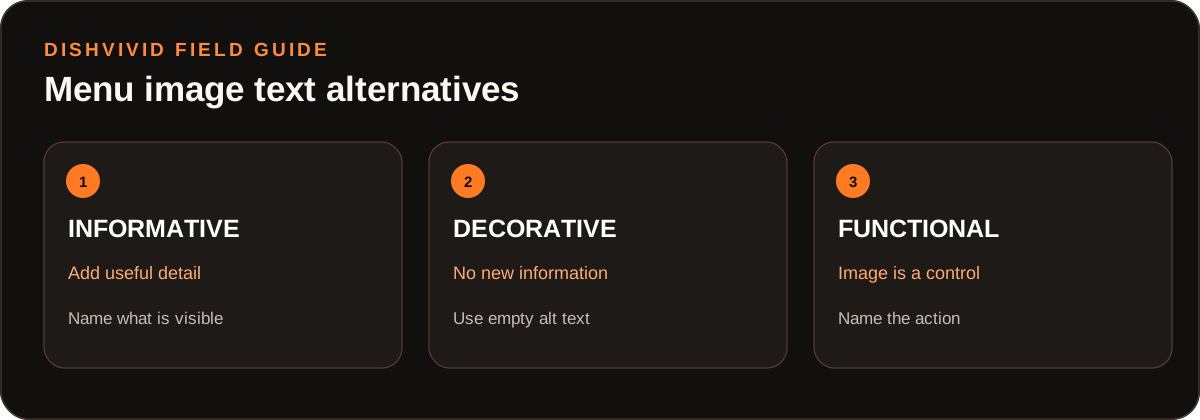
Editorial diagram for planning; it is not a customer photo or measured result.
Image Roles on Digital Menus: Informative, Decorative, and Functional
Online ordering platforms, restaurant websites, and digital menus display images in distinct contexts. Applying the same blanket formula to every file leads to repetitive, clumsy screen reader output. Accessibility standards established in the W3C WAI Images Tutorial categorize web images into specific operational roles. Applying these distinctions to digital food menus clarifies what needs description and what should remain silent:
- Informative Images: These are primary food photographs that visually convey substantive details about a dish—portion size, garnish, char level, side pairings, or vessel type—that the item title alone does not convey. Informative images require descriptive alt text that supplements the adjacent text without repeating it verbatim.
- Functional Images: When a photo serves as an interactive control—such as a clickable card that triggers an item customization drawer, or a category thumbnail linking to the dinner section—the alt text must describe the action or destination of the button rather than just the visual contents of the plate.
- Decorative Images: Ambient background graphics, patterned header borders, wood-grain textures, and generic iconography (such as a fork and knife icon next to the "Entrees" heading) serve purely aesthetic purposes. Under accessibility standards, decorative assets should carry an empty alt attribute (
alt=""). This syntax instructs assistive software to bypass the file entirely, preventing screen reader users from enduring unnecessary auditory clutter.
Before-and-After Alt-Text Decision Matrix by Image Role
The following matrix provides concrete examples of common menu image placements, contrasting counterproductive copywriting against accurate, role-specific alternatives.
(Note: The matrix below is an editorial illustration created to guide restaurant operators during menu prep; it does not represent customer case data.)
| Image Context & Placement | Ineffective Alt Text (Before) | Optimized Alt Text (After) | Why the Correction Works |
|---|---|---|---|
| Standard Item Card (Dish title and price displayed directly beside photo) |
alt="Cheeseburger $15 best burger in town" |
alt="Brioche bun burger topped with melted cheddar, sliced red onion, and dill pickle chips." |
Eliminates redundant price and sales superlatives; describes visible topping layers and bun type. |
| Dish with Ambiguous Accompaniments (Entree served with unlisted side elements) |
alt="Photo of steak dinner plate" |
alt="Sliced medium-rare flank steak fanned beside chimichurri sauce and roasted fingerling potatoes." |
Drops the filler phrase "Photo of"; identifies cut, doneness, side dish, and condiment shown in the frame. |
| Shared Appetizer Platter (Menu item intended for multi-guest dining) |
alt="Appetizer sampler delicious starters" |
alt="Wooden serving board with four soft pretzel bites, warm beer cheese dip, and spicy brown mustard." |
Replaces generic adjectives with specific piece counts, dip varieties, and serving presentation. |
| Interactive Category Card (Clickable image that navigates to a menu sub-section) |
alt="Cocktail glass with lime garnish" |
alt="View handcrafted cocktail and beverage menu" |
Treats the element as functional; informs screen reader users where clicking the element leads. |
| Beverage with Non-Standard Garnish (House specialty drink with layered presentation) |
alt="Signature iced tea drink" |
alt="Tall glass of layered black tea and lemonade garnished with fresh mint sprigs and lemon wheel." |
Specifies liquid layering, glassware, and physical garnish visible to sighted customers. |
| Decorative Category Divider (Abstract watercolor illustration above pasta section) |
alt="Italian restaurant graphic illustration drawing" |
alt="" |
Sets alt attribute to null; allows screen readers to navigate directly to menu section headings without interruption. |
A Step-by-Step Sequence for Writing Menu Alt Text
Establishing an internal sequence for your menu management team ensures consistency across seasonal updates and menu additions:
- Read the Adjacent Display Text First: Review the dish title, subtitle, and menu description already published on the ordering card. If the headline states "Margherita Pizza," your alt text does not need to start with "This is a margherita pizza."
- Identify the Visible Information Gap: Determine what the photograph shows that the text leaves out. Does the photo show five tacos or three? Is the sauce served on top or in a ramekin on the side? Is the dessert dusted with powdered sugar? Focus your description on these concrete visual facts.
- Draft a Direct Visual Summary: Describe the dish concisely, aiming for 80 to 140 characters. Use plain descriptive nouns and adjectives: specify bun types, crust styles, visible herb garnishes, sauces, and plating vessels.
- Remove Filler and Promotional Claims: Delete introductory filler words like "image of," "picture of," or "graphic showing." Eliminate unsubstantiated promotional language like "mouthwatering," "crispy perfection," or "best in the city." As outlined in Google Images SEO Best Practices, search engines prioritize descriptive, context-relevant text over repetitive promotional phrasing or forced keyword strings.
- Verify Element Functionality: Check whether the image serves as an active link or modal trigger. If clicking the image adds the item directly to a digital cart or expands modifiers, format the alt text to convey that functional action.
Worked Example: The "Grilled Salmon" Card (Hypothetical Menu Item)
(Note: The following example is a hypothetical menu item created by the DishVivid Editorial Team for illustrative training purposes, not a real restaurant test.)
Consider an online ordering card featuring an entree with the following text elements:
- Item Title: Grilled Salmon
- Price: $26.00
- Menu Description: Wild-caught Pacific coho fillet with seasonal sides and lemon herb dressing.
When preparing the image for this card, operators often fall into one of two common copywriting traps:
- The Duplicate Label Trap: Writing
alt="Grilled Salmon". When assistive software reads this card, it announces: "Grilled Salmon, Heading Level 3. Image: Grilled Salmon. $26.00. Wild-caught Pacific coho fillet with seasonal sides and lemon herb dressing." The listener hears the title twice in three seconds without gaining any visual insight from the photograph. - The Keyword-Stuffing Trap: Writing
alt="Best grilled salmon fresh seafood dinner gluten free restaurant delivery downtown". This pattern violates platform guidelines, degrades user trust, and provides zero helpful description of the actual plate.
The Accurate Operational Approach: Inspect the actual food photo. Suppose the image shows a grilled fillet displaying defined grill marks, rested on a bed of roasted asparagus spears, accompanied by a small porcelain ramekin of pale green herb oil and a charred lemon half.
The accurate, additive alternative text is:
alt="Grilled salmon fillet with dark sear marks, served over roasted asparagus with a side ramekin of herb oil and half a charred lemon."
This text communicates the precise plating, visual doneness, and exact vegetable accompaniment shown in the photograph without repeating adjacent pricing or title metadata.
Operational Trade-Offs and Common Pitfalls
Balancing speed of menu deployment against visual accessibility requires navigating real-world trade-offs:
- Descriptive Depth vs. Auditory Fatigue: Writing comprehensive paragraph-length descriptions for a sixty-item menu overwhelms customers using screen readers. Describe the main protein or starch, cooking surface cues (e.g., golden crust, charred edges), and primary garnishes. Leave minor seasonings or plate rim details unmentioned unless they represent critical culinary components.
- Search Optimization vs. User Accessibility: Operators sometimes try to use alt tags as hidden keyword bins. Search crawlers evaluate image alt text against surrounding page content; cramming zip codes or unrelated dish names into alt text creates relevance mismatches and damages usability. Keep descriptions focused solely on the depicted food.
- Reviewing Cropping and Framing in DishVivid Studio: Menu images uploaded to aggregator platforms are frequently cropped into square or circular formats depending on the platform layout. Before writing your alt text, upload your images to DishVivid Studio to inspect framing, standardize crops, and verify lighting. If an automated crop cuts off the side dish or sauce ramekin, your alt text must not describe components that are no longer visible in the final viewport. If your team evaluates optional AI adjustments in Studio, compare the result directly against your physical prep sheet to ensure no unapproved garnishes or altered ingredient ratios are introduced. For comprehensive photo staging advice, consult our general menu photography guides on the DishVivid blog.
Operator Pre-Publish Checklist for Menu Alt Text
Before publishing new or revised photography across your website and ordering channels, review each image against this quality control checklist:
- Every image file includes an explicit
altattribute (either populated or deliberately empty for decorative assets). - Purely decorative textures, divider lines, and background graphics use
alt=""so screen readers ignore them. - Informative food images describe visible plate attributes without repeating the adjacent dish title word-for-word.
- Phrases such as "image of," "photo of," and "picture of" are completely removed.
- Subjective promotional phrases ("delicious," "tastiest," "award-winning") are omitted in favor of concrete visual ingredients.
- Descriptions reflect the final cropped image visible in the layout, verified through DishVivid Studio adjustments.
- Interactive thumbnail buttons specify the link action rather than a passive food description.
- Alt text length remains concise, generally between 80 and 140 characters per dish item.
Sources
- W3C WAI Images Tutorial — International web accessibility standards defining informative, decorative, and functional image classifications and authoring methods.
- Google Images SEO Best Practices — Search engine guidelines on contextual alt text creation, semantic accuracy, and keyword stuffing prevention.