A File Naming System for Restaurant Menu Photos
When a restaurant updates its menu, photo files often accumulate under unhelpful names: IMG_4092.jpg, burger-final-edit.png, or cheeseburger-square(1).jpg. Over months of seasonal additions and price adjustments, these ambiguous labels create operational confusion. Kitchen staff cannot verify whether a file reflects the current plating, marketing contractors publish outdated ingredients, and teams accidentally overwrite original high-resolution captures when exporting smaller crops for third-party ordering apps.
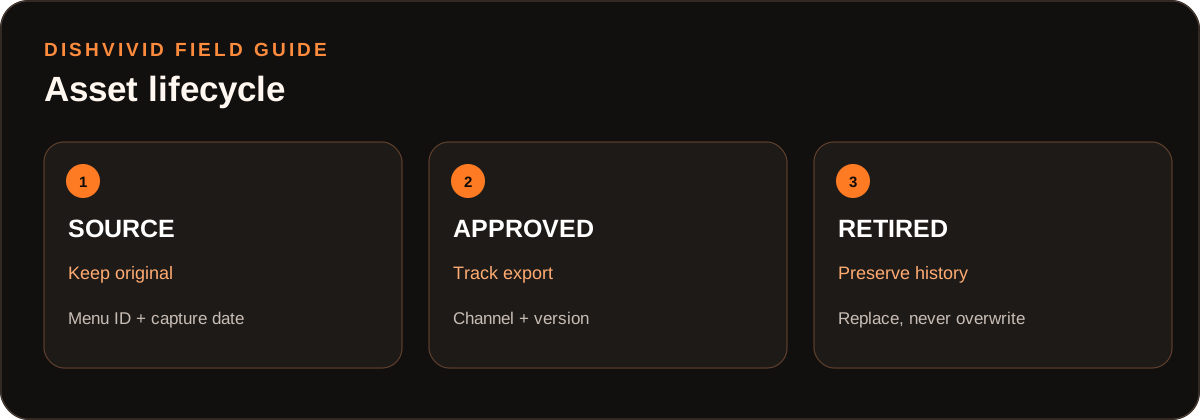
Editorial diagram for planning; it is not a customer photo or measured result.
A structured restaurant menu photo file naming system solves this by connecting image files directly to your point-of-sale (POS) menu items. By combining a standardized filename syntax with a lightweight SKU-to-image asset ledger, restaurant operators can maintain an accurate visual record, distinguish untouched masters from channel crops, and manage seasonal menu rotations without specialized software.
The Core Filename Grammar: Distinguishing Masters from Exports
A dependable image archive requires two distinct tiers: Source Masters and Channel Exports. Source masters represent the original, high-resolution photographs taken on the pass or photo table. Channel exports are cropped, compressed files formatted for specific destinations like online menus, social channels, or POS terminals.
Never save edited or cropped versions over the original camera files. Using two distinct filename patterns enforces this separation across your storage drive:
1. Source Master Grammar (Raw & Uncropped)
[ITEM-ID]_[DISH-SLUG]_[YYYYMMDD]_[ANGLE]_RAW.[ext]
Example: BURGER-014_classic-cheeseburger_20260915_45deg_RAW.jpg
2. Channel Export Grammar (Derivative Crops)
[ITEM-ID]_[DISH-SLUG]_[ASPECT-RATIO]_[CHANNEL]_[VERSION].[ext]
Example: BURGER-014_classic-cheeseburger_1x1_web_appr-v1.jpg
Component Breakdown
ITEM-ID: The exact menu code, SKU, or item ID from your POS system. This identifier remains stable even if marketing updates the customer-facing name.DISH-SLUG: A lowercase, hyphenated description of the dish. As detailed in the Google Search Central Image SEO Guide, descriptive filenames give search engines useful context about image content.YYYYMMDD: The capture date (ISO 8601 numeric order). This ensures files sort chronologically by default.ANGLE: The perspective of the capture (e.g.,topdown,45deg,eyelevel,macro).ASPECT-RATIO: The crop geometry required by the display surface (e.g.,1x1,16x9,4x3).CHANNEL: The destination platform (e.g.,pos,doordash,uber,web,print).VERSION: Approval and iteration status (e.g.,appr-v1,draft-v2,ret-v1).
Worked Example: Managing Asset Lifecycle for BURGER-014
(Note: The following workflow illustrates a hypothetical menu item and operational sequence.)
Consider a single menu offering: the Classic Cheeseburger, tracked in the POS as BURGER-014.
Phase 1: The Initial Photo Shoot
On September 15, 2026, the restaurant shoots new imagery. The photographer captures two primary angles under controlled lighting:
BURGER-014_classic-cheeseburger_20260915_45deg_RAW.jpgBURGER-014_classic-cheeseburger_20260915_topdown_RAW.jpg
These files move directly into an archive folder named 01_MASTERS. Staff members have read-only access to prevent accidental renaming or deletion.
Phase 2: Processing and Channel Cropping
To prepare the image for digital menus, the operator needs a balanced square crop with calibrated exposure. Operators can use the DishVivid Studio to make manual lighting and framing adjustments while comparing candidate crops directly against the raw capture to ensure the food remains faithful to what the kitchen serves.
Once approved, two delivery files are generated for the live menu:
BURGER-014_classic-cheeseburger_1x1_web_appr-v1.jpg(Square crop for the direct ordering website)BURGER-014_classic-cheeseburger_16x9_web-banner_appr-v1.jpg(Horizontal crop for the restaurant's own website banner)
Phase 3: Plating Modification Without Overwriting
Two months later, the kitchen replaces the brioche bun with a seeded potato bun and adjusts the pickle garnish. Rather than deleting or overwriting the original assets:
- The team conducts a new shoot on November 10:
BURGER-014_classic-cheeseburger_20261110_45deg_RAW.jpg - A replacement export is generated:
BURGER-014_classic-cheeseburger_1x1_web_appr-v2.jpg - The previous file (
BURGER-014_classic-cheeseburger_1x1_web_appr-v1.jpg) is moved to an03_RETIREDfolder and marked inactive in the ledger.
The restaurant preserves an unbroken visual record of both versions, preventing accidental display of the discontinued presentation.
The Lightweight SKU-to-Image Asset Ledger
File naming conventions rely on discipline, but team members need a quick way to look up approval states, publication dates, and channels. A simple spreadsheet hosted in your shared workspace functions as an effective asset ledger.
(Table: Editorial illustration of an operational asset ledger.)
| Item ID | Dish Name | Filename | Capture Date | Channel | Status | Retirement Date | Notes |
|---|---|---|---|---|---|---|---|
BURGER-014 |
Classic Cheeseburger | BURGER-014_classic-cheeseburger_20260915_45deg_RAW.jpg |
2026-09-15 | Archive | Master | — | Original shoot, 45° angle. |
BURGER-014 |
Classic Cheeseburger | BURGER-014_classic-cheeseburger_1x1_web_appr-v1.jpg |
2026-09-15 | Web Menu | Retired | 2026-11-10 | Brioche bun plating; replaced by v2. |
BURGER-014 |
Classic Cheeseburger | BURGER-014_classic-cheeseburger_1x1_web_appr-v2.jpg |
2026-11-10 | Web Menu | Active | — | Seeded bun update; current live asset. |
BURGER-014 |
Classic Cheeseburger | BURGER-014_classic-cheeseburger_16x9_web-banner_appr-v1.jpg |
2026-09-15 | Web banner | Needs replacement | 2026-11-10 | Old bun; remove from public use until a new crop is approved. |
SALAD-003 |
Seasonal Heirloom Salad | SALAD-003_heirloom-salad_20260701_topdown_RAW.jpg |
2026-07-01 | Archive | Master | — | Summer seasonal run. |
SALAD-003 |
Seasonal Heirloom Salad | SALAD-003_heirloom-salad_1x1_web_appr-v1.jpg |
2026-07-01 | Web Menu | Retired | 2026-09-01 | Fall menu swap; archive for next season. |
Common Failure Modes and Practical Trade-offs
When establishing a photo naming system, restaurant teams encounter several common friction points:
- Special Characters and Spaces: Filenames containing spaces, parentheses, or symbols (such as
Burger (Square) Final!.jpg) often break when uploaded to POS backends, web servers, or cloud delivery feeds. Stick strictly to alphanumeric characters, hyphens, and underscores. - Premature Deletion of Masters: Saving crops directly over camera masters saves disk space but prevents future reformatting. When a delivery platform changes its recommended dimensions from 4:3 to 16:9, a cropped master cannot be rebuilt cleanly. Storage is inexpensive; always keep untouched raw captures.
- Overly Detailed File Tokens: Attempting to include full ingredient lists or photographer names inside the filename creates unwieldy strings like
BURGER-014_cheeseburger_cheddar_pickles_aioli_mike-photo_square_v1.jpg. Long names truncate in file browsers. Keep filenames focused on item code, dish name, aspect ratio, and status; place secondary production details into the ledger notes. - Folder Hierarchy vs. Flat Search: Grouping files into deeply nested subfolders (
/Photos/2026/Fall/Burgers/Plates/Final/) makes routine lookups cumbersome. A simpler structure uses three top-level directories:01_MASTERS,02_ACTIVE_EXPORTS, and03_RETIRED.
Operational Implementation Checklist
Use this checklist before publishing or updating food photography across your menu channels:
- Verify POS Alignment: Ensure every dish has a documented POS item code before the photo shoot begins.
- Archive Untouched Originals: Transfer camera files directly into
01_MASTERSusing the[ITEM-ID]_[SLUG]_[YYYYMMDD]_[ANGLE]_RAWformat. - Establish Delivery Specs: Determine required aspect ratios (
1x1,16x9,4x3) for each target channel. - Standardize Export Names: Apply the
[ITEM-ID]_[SLUG]_[RATIO]_[CHANNEL]_[VERSION]format to all web crops. - Validate Kitchen Accuracy: Check cropped and color-balanced assets against the original master in DishVivid Studio or during team review to ensure the image accurately represents the served portion.
- Update the Asset Ledger: Record capture date, channel assignment, approval state, and retirement dates in the shared spreadsheet.
- Archive Superseded Assets: When recipes or platings change, move superseded files to
03_RETIREDrather than deleting them.
For additional resources on organizing restaurant visual assets and preparation standards, explore the guides on the DishVivid Blog.
Sources
- Google Search Central: Google Images SEO Best Practices — Guidance on descriptive file naming, file path context, and search engine crawling considerations.